Live on npm and the official MCP registry
Your generator gave you 6 screens. UXLoom proves you're missing 9 states.
v0, Lovable, Figma Make, Claude — every AI generator hands you the happy path. UXLoom is the critic layer: it takes the screens any generator produces, weaves them against your journey definition, and proves what's missing before a line of code exists.
The problem
The happy path is not a product.
Generators are astonishing at the first draft: six clean screens, ideal data, nothing loading, nothing failing, nobody offline. Then real users arrive with empty carts, expired sessions, and airplane mode.
Those gaps used to surface in code review, QA, or production. UXLoom surfaces them at design time — as a machine-checkable report, not a designer's hunch.
$ npx uxloom check ./design

✔ journey.graph.json parsed — 6 screens, 14 transitions

✖ 2 dead ends       checkout/error has no exit transition
✖ 1 unreachable     order-status is never entered
✖ 9 missing states  see coverage matrix below
▲ 3 contrast fails  btn.secondary 2.9:1 (WCAG needs 4.5:1)
▲ 2 touch targets   cart/remove is 28×28 (min 44×44)
▲ 1 overflow risk   de-DE +34% breaks nav label

journey coverage: 21/30 required states · 70%
State coverage
Every screen, every state, accounted for.
UXLoom models your journey as a state machine and checks each screen for the states real usage demands. This is the matrix behind the headline — six generated screens, nine required states nowhere to be found.
| screen | default | loading | empty | error | offline |
|---|---|---|---|---|---|
| sign-in | ● | ● | – | ✖ | – |
| browse | ● | ✖ | ● | ● | – |
| search | ● | ✖ | ✖ | ● | – |
| cart | ● | ● | ✖ | ● | – |
| checkout | ● | ● | – | ✖ | ✖ |
| order-status | ● | ● | – | ✖ | ✖ |
What UXLoom proves
Five checks. Zero opinions, all evidence.
Journey completeness
Your flow is a state machine, so UXLoom treats it like one: it finds unreachable screens, dead ends, and transitions with no error path.
State coverage
Empty, loading, error, and offline states — checked per screen against what the journey actually requires, not a generic checklist.
WCAG contrast
Every text and interactive color pair measured against WCAG thresholds, so accessibility failures never survive to implementation.
Touch targets
Interactive elements verified against minimum target sizes before anyone taps the wrong thing on a real phone.
Text expansion
Labels stress-tested with localization growth factors to catch the German string that breaks your nav before translators do.
Proof, not vibes
Every finding is a deterministic check over design-as-data. Same input, same report — reviewable, diffable, CI-friendly.
How it works
Threads and screens, woven together.
A loom holds warp threads under tension and weaves the weft through them. UXLoom holds your journey under tension and weaves your screens through it — anywhere a thread doesn't cross a screen, you have a gap.
Generate anywhere
Keep using v0, Lovable, Figma Make, or Claude. UXLoom doesn't replace your generator — it critiques whatever it produces.
Define the journey
Describe the flow once in JourneyGraph, an open design-as-data format: screens, states, transitions, and requirements.
Get the proof
Run uxloom check — or let your agent run it — and get a precise report of every missing state, dead end, and violation.
{
  "screen": "checkout",
  "states": ["default", "loading", "error", "offline"],
  "transitions": [
    { "on": "pay",          "to": "order-status" },
    { "on": "pay:error",    "to": "checkout#error" },
    { "on": "retry",        "to": "checkout#loading" }
  ]
}
Agent-native
Built for the agent loop, not around it.
UXLoom ships as an MCP server, so any agent can call it mid-conversation: generate screens, validate, patch the gaps, validate again — no human copy-pasting reports in between.
Agent Skills are included, so Claude Code and other MCP clients know how to write JourneyGraph files and act on findings out of the box.
- Claude Code
- Codex
- any MCP client
- Agent Skills included
- JourneyGraph — open format
- MIT licensed
agent:  generate screens for the checkout journey
uxloom: ✖ 9 missing states, 2 dead ends
agent:  add error + offline states, wire retry
uxloom: ✔ journey complete · 30/30 states · 0 violations
Field notes
First production engagement, measured.
A real self-hosted notification platform: its operator dashboard was generated by a leading AI UI tool from a carefully written prompt that even asked for "every state". UXLoom modeled the same dashboard both ways — as generated, and as contracted.
in the prompt-level design: 4 of 5 journeys could never complete, three dead-end screens, 36px touch targets on mobile, labels German breaks.
after contracting: 6 journeys, 49 states — including the public unsubscribe page the generator forgot, because no nav links to it.
then uxloom audit checked the real code against the
contract — surfacing a token-less unsubscribe page (a compliance hole)
and an onboarding flow hardcoded to never finish.
The critic also caught its own operator: the first "complete" contract draft shipped three journeys without an end state. That's the point — the report doesn't care who designed it.
Get started
Two commands to your first proof.
Prerequisites: Node.js 20+ and Claude Code, Codex, or any MCP client. No account, no API key.
-
Connect UXLoom — one command in your project
directory sets up the MCP server, the agent skill, and a starter
file:
npx uxloom init -
Ask your agent for a design — e.g. “Design the user
journeys and screens for a habit-tracking app using UXLoom. Iterate
until validation is clean.” Only taste questions reach you; the
design lands in
uxloom.project.json— commit it. -
Watch it live, review it together —
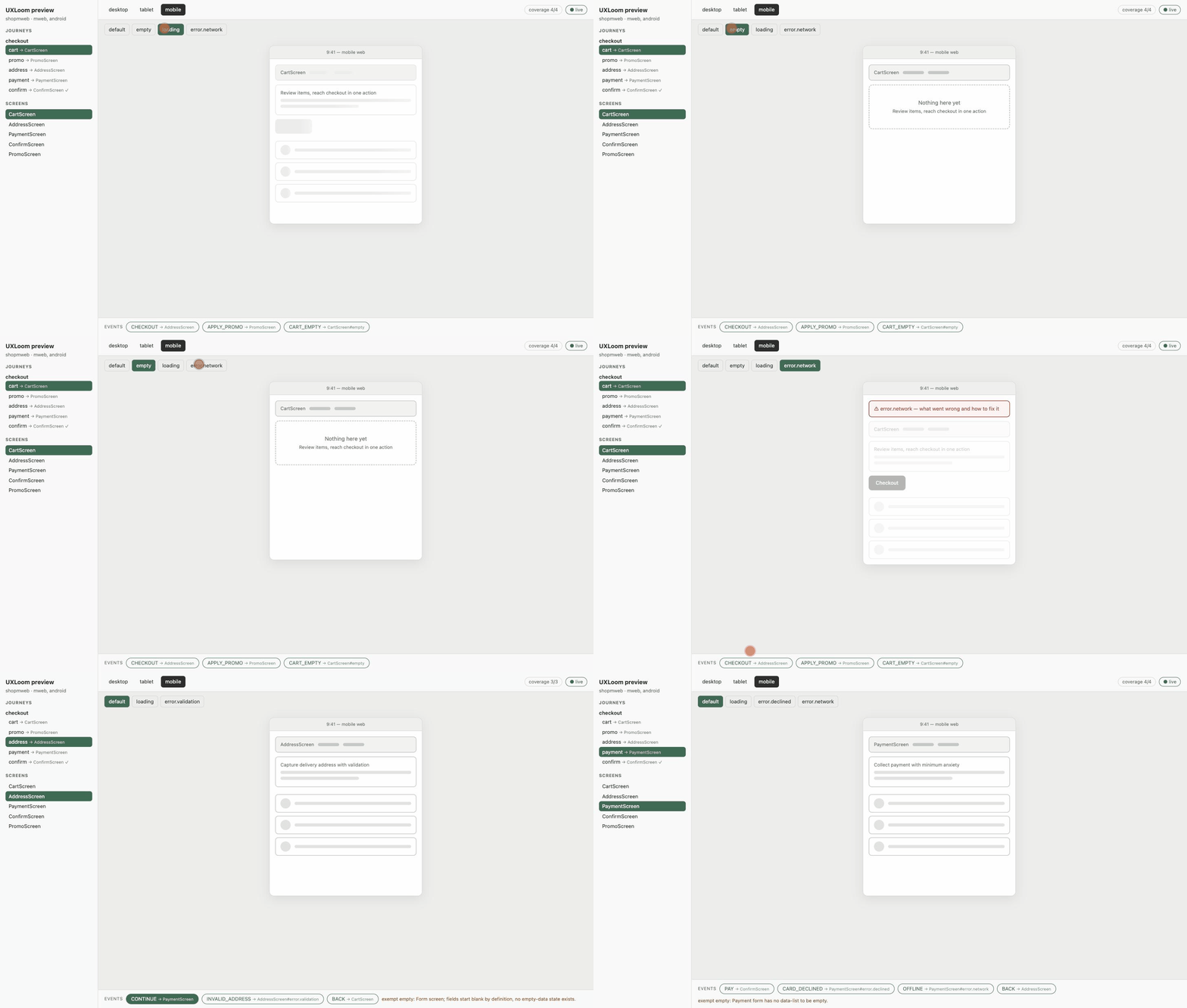
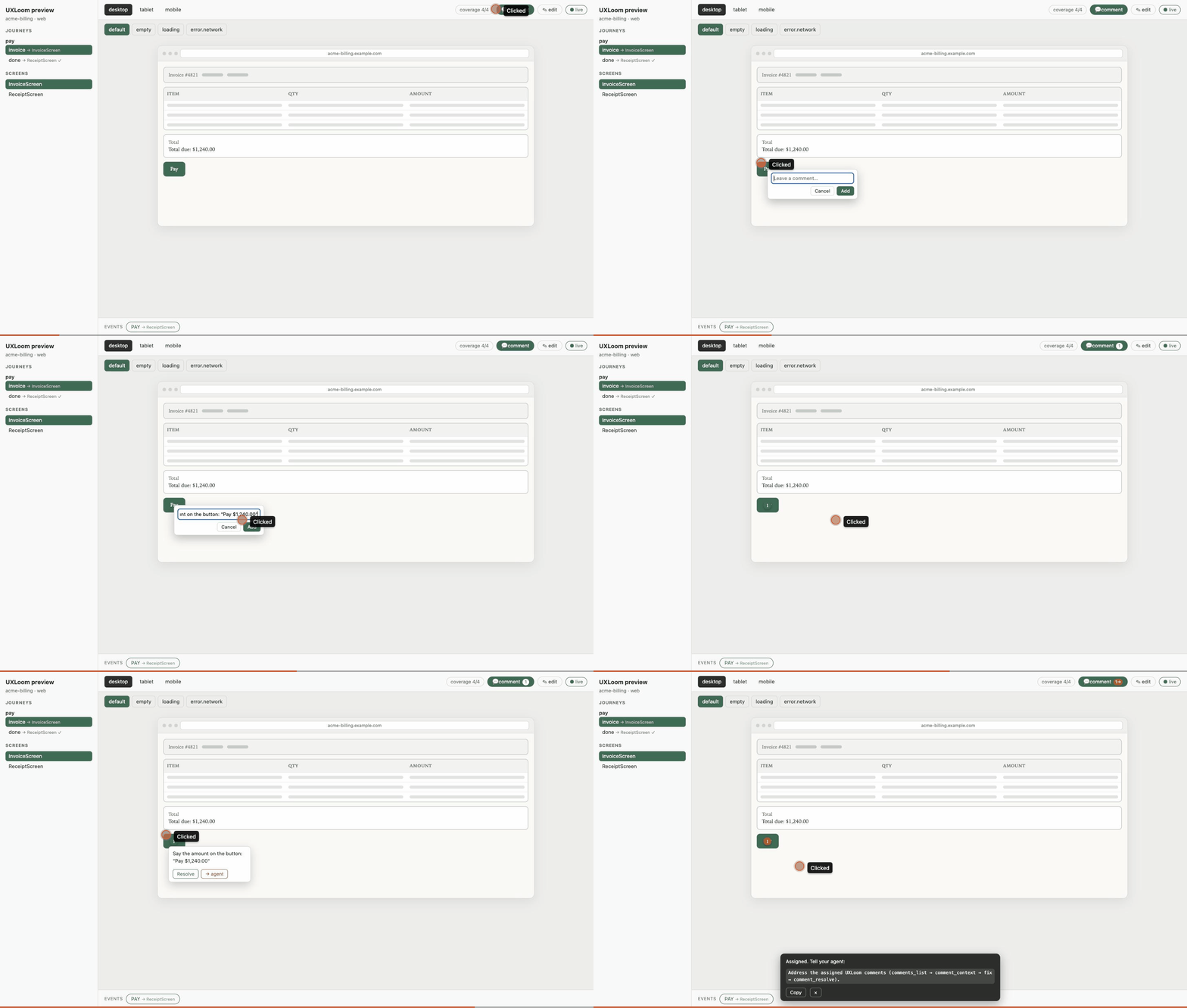
npx uxloom previewrenders mocks of every screen while the agent designs: every contracted state derived automatically, desktop/tablet/mobile frames, clickable journey events — themed by your design tokens, with a comment mode where reviewers drop pins that flow straight into the validation loop. Click “→ agent” on any pin to hand it to the model: it reads the comment, the exact layout block it points at, and the screen contract, makes the change, and resolves the pin live. Share with anyone vianpx uxloom export(one self-contained HTML file). -
Gate it forever —
npx uxloom check(design completeness) andnpx uxloom audit(implementation drift — web and native via Swift/Kotlin/Dart markers, with live DOM verification) exit 1 on failure, with--json/--sarif/--githuboutputs for CI and a baseline mode for adopting on existing apps. Review design changes in PRs withnpx uxloom diff.

Full walkthrough, Codex setup, and troubleshooting: QUICKSTART.md
Questions
Asked and answered.
What is UXLoom?
An open-source, agent-native UI/UX design validator. It models user journeys as state machines, treats screens as nodes with state contracts, and mechanically proves what a design is missing — unreachable screens, dead ends, missing error, empty and loading states, WCAG contrast failures, undersized touch targets, and labels that overflow under localization — before any production code exists.
How do I validate AI-generated UI from v0, Lovable, Figma Make, or Claude?
Register the generated screens and a journey definition with the UXLoom MCP
server, then run project_validate. UXLoom returns a machine-checkable
report of every gap the generator skipped, with concrete fixes. Iterate until the
report shows zero errors.
Does UXLoom work with Claude Code and Codex?
Yes. UXLoom ships as an MCP server that works with Claude Code
(claude mcp add uxloom -- npx -y uxloom), Codex CLI
(codex mcp add uxloom -- npx -y uxloom), and any MCP-compatible
client. An Agent Skill encoding the journey-first workflow is included for both.
What does UXLoom check?
Five critics: journey completeness (unreachable screens, dead ends, broken transitions), state coverage (empty, loading, error and offline states per screen), WCAG 2.2 AA contrast, platform touch-target minimums (44pt iOS, 48dp Android, 24px web), and text-expansion overflow for localization.
Can UXLoom check whether my code actually implements the design?
Yes — npx uxloom audit compares the implementation against
the contract. Mark where each state renders with
data-ux-state attributes (or map screens to paths in
uxloom.map.json) and every contracted state gets a verdict:
implemented with file:line evidence, unimplemented, or unproven. Static
analysis never grants a pass without evidence, and the exit code gates CI —
design completeness and implementation fidelity, both enforced.
Why should I trust the design an AI agent produces?
Because UXLoom makes the agent show its work. Every major decision —
information architecture, flows, screen patterns, colors — can carry
rationale: the reasoning, the alternatives that were
rejected (with their genuine pros and cons), sources for factual
claims, and a confidence level. Once a project adopts this,
undocumented or thin decisions become findings, an iterative
design_review loop (maximum 3 rounds, enforced) critiques
the design against market conventions, and the full evidence renders
in the preview and exports — so you see why every element is
on screen, not just that it is.
Can a reviewer hand a comment straight to the AI agent?
Yes. In the live preview a reviewer pins a comment on any screen
and clicks “→ agent”. The comment becomes a work
item any Gen-AI model can read with full context: comment_context
returns the exact layout block the pin points at, the screen’s
contract, the journey states that use it, and the current findings
for that screen. The agent makes the change and calls
comment_resolve with a note — the pin clears live in the
reviewer’s browser. One click turns feedback into addressed work,
with no back-and-forth explaining what or where.
Is UXLoom free?
Yes — open source, MIT licensed. The design data lives in a plain JSON file
(uxloom.project.json) versioned in your own git repository.
Open source · MIT
The loom is live.
On npm, in the official MCP registry, benchmarked in public with the scorecard attached to every release. No waitlist, no account, no API key — one command and your agent designs against contracts.